HP Officejet Pro 8600 "Scan to Network Folder" always fails on Windows 10
Setting up Scan to Network Folder on an HP Officejet Pro 8600 always ended in an error, because the printer only speaks SMB1. Enabling the Windows SMB 1.0/CIFS Server feature made it work, at a security cost.
Symptoms #
The Scan to Network Folder setup wizard on an HP Officejet Pro 8600 always ended with a generic error when pointed at a share on a Windows 10 PC.
Cause #
The 8600's firmware only supports SMB 1.0 for network folders. Windows 10 ships with the SMB1 server disabled.
Fix #
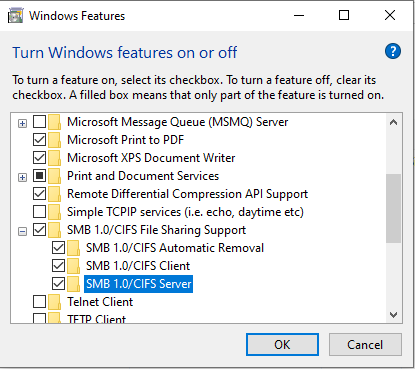
Found in this HP community thread: enable the SMB1 server and reboot.
Control Panel → Programs and Features → Turn Windows features on or off → SMB 1.0/CIFS File Sharing Support → tick SMB 1.0/CIFS Server → OK, then reboot.
Caution (2026): SMB1 is obsolete and was the vector for WannaCry. Only enable it on a trusted network, ideally on a machine whose only job is receiving scans. Scan-to-email or HP's own scanning software avoid SMB entirely.